Pixel Display: A Hybrid Typeface for Modern Design
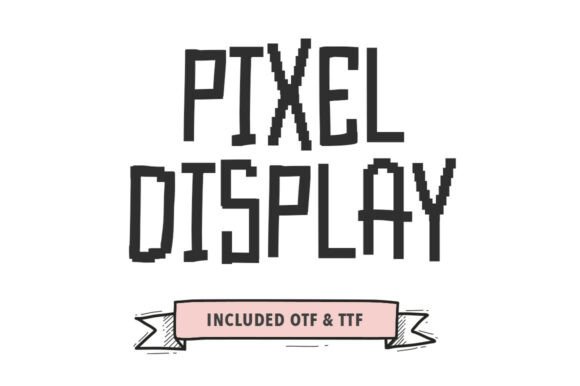
If you've ever wanted to bridge the gap between digital nostalgia and handcrafted authenticity, the Pixel Display typeface is designed precisely for that creative tension. This unique hybrid font merges the blocky, low-resolution charm of early digital graphics with the organic, imperfect lines of hand-drawn lettering, resulting in a display font that feels both retro and refreshingly contemporary.
What makes Pixel Display stand out is its intentional "glitchy" aesthetic. The characters are tall and condensed, built from visible pixelated steps along the edges, yet they carry a loose, monolinear weight that suggests they were sketched by hand. This combination gives the font a playful, lo-fi personality perfect for projects that need a distinct digital-humanist edge. It’s more than just a creative font; it’s a design asset that can instantly inject character and narrative into your work.
Where Does This Typeface Shine?
Pixel Display excels in scenarios where you want to evoke a sense of indie creativity, tech-savviness, or stylized retro-futurism. Its versatile personality makes it a strong candidate for a variety of applications, moving beyond simple text to become a key part of your visual identity.
- Logo and Brand Identity: It’s an excellent choice for crafting memorable logos, especially for indie game studios, tech startups, creative coding blogs, or streetwear brands looking for a unique typographic voice.
- Poster and Editorial Design: Use it for headlines, pull quotes, or chapter titles in magazines, book covers, and event posters to create immediate visual impact and set a specific mood.
- Packaging and Merchandise: The font’s bold character translates beautifully to product packaging, clothing tags, and merchandise, helping items stand out on a shelf or in an online store.
- Digital and Social Media: It grabs attention in social media graphics, YouTube thumbnails, website headers, and app interfaces, making your digital presence feel more curated and engaging.
Tips for Choosing and Using Pixel Display
Integrating a premium font like this into your projects is about more than just liking its look. To ensure it works effectively, consider these practical steps.
First, always test for readability in context. While it’s a display font meant for headlines, ensure its unique letterforms remain clear at the size you intend to use, whether on a small mobile screen or a large printed poster. Its condensed nature works best where space is limited but impact is needed.
Second, think about font pairing. Pixel Display has a strong personality, so it often pairs well with a cleaner, simpler sans-serif or serif font for body text. This contrast creates a balanced hierarchy, allowing your display typeface to command attention without overwhelming the overall design. For example, pairing it with a neutral sans-serif can make your headings pop while maintaining readability for longer passages.
Finally, review the full character set and license before purchasing or downloading. Check for essential glyphs, stylistic alternates, and language support that match your project’s needs. Understanding the license—whether it’s for personal use, commercial work, or specific platforms—is crucial for avoiding issues down the line and ensures you can use your chosen typeface confidently across all your design assets.
Choosing the right typeface is a foundational decision that impacts brand recognition, visual consistency, and the professional polish of your final output. A well-designed font like Pixel Display doesn’t just hold words; it conveys a mood, tells a story, and helps solidify the identity of your project. By thoughtfully selecting and applying a creative font that aligns with your vision, you elevate your work from merely functional to genuinely memorable.